



Description
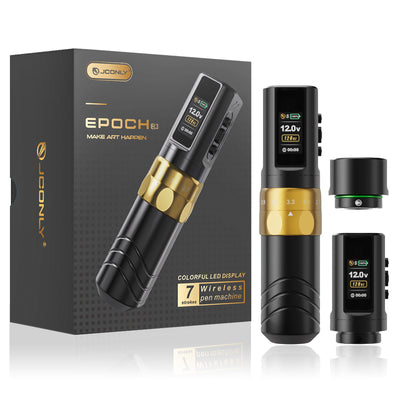
JCONLY® EPOCH R4 Wireless Tattoo Machine 5.0mm – Precision Meets Power
The 5.0mm stroke tattoo machine is built for high-precision, technical tattooing. It delivers a hard-hitting response for detailed and high-contrast work.
Ideal for fine line, dotwork, geometric, and realism, ensuring sharp lines, consistent depth, and maximum control.
Adaptive E-Give System: Master Your Needle Strike
Don’t just move the needle—master the conversation between machine and skin. Our Adaptive E-Give System gives you surgical control over needle responsiveness, ensuring the perfect strike for every skin type and technique.
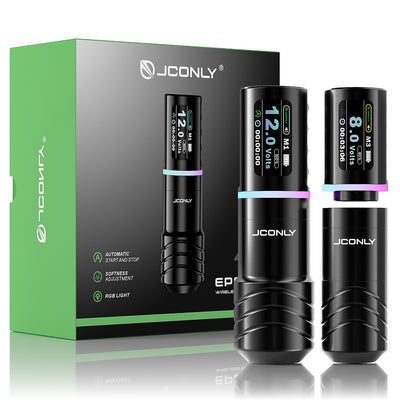
M1 – Hard Hit (Low Give, 100%) | For Bold Foundations
Engineered for zero-cushion, direct impact. Ideal for razor-sharp outlines, saturated blackwork, and traditional lettering.
M2 – Soft Hit (High Give, 80%) | For Artistic Finesse
Optimized with a forgiving, cushioned strike. Perfect for buttery-smooth gradients, hyper-realism, and delicate work.
M3 – Custom Mode (10–100% Give Control) | For Unlimited Creativity
Unlock bespoke performance. Fine-tune your machine to match any needle configuration or artistic style.
Professional Power: Reliable Performance Under Pressure
Whether you're at a grueling convention or a back-to-back studio session, the R4 provides consistent, stall-free power.
Brushless Motor Tech: Stable torque with ultra-low vibration and heat—ensuring a consistent needle stroke.
1800mAh High-Capacity Battery: Get 6–8 hours of wireless freedom, empowering you to finish full-day projects.
Fast Charging (1.5–2 Hours): Minimal downtime means maximum billable time.
5–12V Precision Tuning: Micro-adjust your voltage to find your sweet spot for every lining, shading, or color packing task.
Ergonomic Excellence: Tattoo Longer, With More Precision
Fatigue is the enemy of detail. The R4 is precision-balanced to ensure your hand stays steady from the first line to the final highlight.
Balanced Lightweight Chassis (204–225g): Reduces wrist strain and minimizes hand fatigue.
Tailored Grips (34mm / 38mm): Choose the fit that feels like an extension of your hand for superior control.
Universal Cartridge Compatibility: Use your favorite gear seamlessly—the R4 integrates into your existing setup instantly.
Smart Auto-Run: Workflow Without Interruption
Stay in your creative flow. The Smart Auto-Run System handles the machine state for you—it activates the moment you lift it and pauses when set down. You can easily enable or disable this intelligent feature at any time via a simple double-click + press sequence.
It’s not just convenient; it’s smarter studio hygiene. By reducing unnecessary contact and preventing battery drain, it ensures your workflow remains efficient, hygienic, and uninterrupted from start to finish.
specific
- 1 × Wireless Tattoo Pen Machine
- 2 × 1800mAh Batteries
- 2 × Grips (34mm & 38mm)
- 1 × RCA Adapter & USB-C Cable
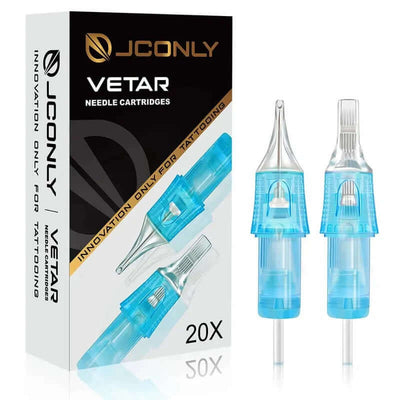
- 4 Boxes Vetar Needles (1003RL/1005RL/1007CML/1009CML)
- 2 × Black Bandages (5cm)
- 100 × Ink Cups & 1 × Pen Bags
- Practice Skin & Protective Film & Gloves
manual
Shipping & warranty
1. Shipping
We ship worldwide.
Order delivery time consists of two parts:
- Processing time: 1–2 business days
- Shipping time: 4–6 business days
Shipping Fees: Orders over $199 enjoy free shipping. For orders below $199, a shipping fee of $16.99 will be applied.
Available logistics services: DHL, UPS, TNT, FedEx, EMS, etc.
2. Warranty
JCONLY offers a one-year quality warranty on all tattoo machines. During this period, any issues will be repaired free of charge.
For machines that break within 30 days and cannot be repaired after contacting customer service, a free replacement will be provided.


